Below, Rusted Gods Life Support & Squad
Read vitals before you authorize the next order.
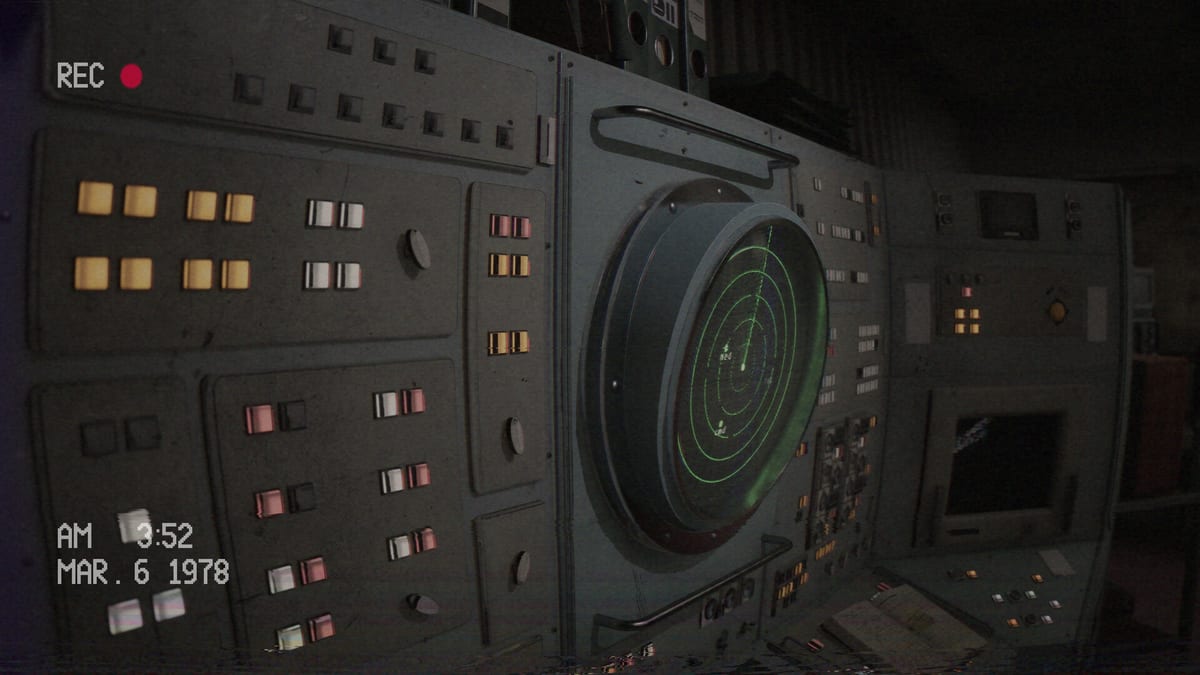
In Below, Rusted Gods, the squad is not an abstract statistic on a loading screen—they are voices you keep alive from a desk covered in aging CRTs. Life support monitoring and the medical console sit beside radar and status as the instruments that answer: Are they still operational enough to follow your next transmission? FromSouthGames has emphasized that helping the squad is core to the full release, with four squad members to guide and consequences when Operator decisions go wrong. This page documents the life-support layer without duplicating frequency tutorials on Terminals & Radio or the combined ping literacy on Radar & Status.
Life support versus status versus medical console
Operators often conflate three related but distinct panels:
| Panel | Primary question | Typical mistake |
|---|---|---|
| Status monitor | Are they ready for the next order? | Treating colors as cosmetic — see Radar & Status |
| Life support feed | Are environmental and squad survival systems stable? | Checking once at shift start, never again |
| Medical console | What injuries or medical flags need acknowledgment? | Ignoring because radio voices sound calm |
Terminals & Radio teaches the full desk loop including frequencies. This page zooms in on vitals, life support, and medical workflows so you complement—not repeat—that guide.
Life support monitor habits
Life support readouts aggregate survival telemetry: pressure cues, environmental stability, and undertones that status alone may not verbalize. Treat life support like radar—return after every major radio beat, not only during obvious crisis audio.
- Glance after squad check-ins. Demo onboarding often pairs “check on them” language with vitals work. If you heard “check” but not the follow-up verb, you may soft-lock—How to Progress When Stuck.
- Log deltas on the checklist. One line (“life support amber after bathroom authorization”) saves hours when branching retail amplifies consequences.
- Do not transmit all-clear while life support disagrees. Decisions & Branching frames honesty as a decision class.
- Pair with radar, not instead of it. Proximity and readiness are different questions.
- Watch for anomaly stress. Facility-side creepy beats can spike life support before voices panic—see Anomalies & Events.
Medical console in the demo and playtest feedback
The demo exposes a medical console zone within the Operator station geography—documented spatially on Operator Station. Closed playtest and Steam discussion threads repeatedly mention layout friction: some builds required Operators to walk around the desk to read printed medical output, which breaks desk-loop rhythm during tense scenes.
This wiki reports that feedback as player-requested QoL, not a guaranteed launch fix. After July 29, 2026 unlock, verify your retail layout in-game before assuming the preview’s walk-around-for-print flow persists. Track changes on Patch Notes and comfort-related asks on Accessibility & Comfort.
Checking squad vitals—the soft-lock connection
The highest-frequency demo stall: Operators complete half of an onboarding instruction (“check vitals” or “check on the squad”) but miss the follow-up to leave the desk—often toward a bathroom beat. Life support and medical reads are the first half of that sentence; facility exploration is the second half.
Recovery flow:
- Headphones on—replay the last sixty seconds (Headphones & Audio).
- Complete life support → status → medical console sweep.
- Stand only when audio authorizes walking—Facility Exploration.
- If still stuck, open How to Progress When Stuck.
Encode the sweep on the Operator Checklist as vitals before verbs.
Four-member squad management in retail
Retail scope guides roughly four squad members into the abyss—expanded from the demo’s narrower moments. Management is not a RTS roster screen; it is attention across voices and vitals:
- Name who you are talking to when radio traffic stacks.
- Cross-check life support when one voice panics while others stay calm—disagreement may be authored.
- Treat squad death as a decision outcome, not random horror—official materials reference Operators killing squad members through bad calls.
- Use Radar & Status for per-member readiness cues when the UI distinguishes them.
Full-game versus demo scope: Full Game vs Demo.
Spatial placement at the Operator desk
Life support and medical hardware live in the primary monitoring bank and adjacent medical zone described on Operator Station. Learn sight lines before launch nerves erase them:
- Sit and identify life support versus general status without prompts.
- Walk the medical console loop once calmly, then once under self-imposed time pressure.
- Return to the chair and narrate which panel you would check first after a scare.
Desk fluency beats memorizing wiki prose.
Retail importance per developer messaging
FromSouthGames’ itch update roughly a week before launch reiterated that branching and squad help are core to the full game—not optional side systems bolted onto horror set dressing. Life support literacy therefore scales with narrative consequence: negligent vitals checks that merely annoyed demo players may branch or kill in retail.
Prepare by drilling demo habits, then reset stakes with Review and Launch News.
Steam Deck and readability
Steam Deck Verified (July 20, 2026) keeps default UI legible on handheld, but life support text still demands attention—especially if playtest requests for larger monitor text land in options menus. Confirm readability on Steam Deck Verified and Accessibility & Comfort after unlock.
Related pages
- Operator Station — where life support and medical zones sit
- Radar & Status — ping and vitals pairing
- Terminals & Radio — frequency loop (not duplicated here)
- How to Progress When Stuck — vitals-then-bathroom soft-locks
- Decisions & Branching — consequence framing
- Anomalies & Events — vitals flicker during facility-side scares
- Full Game vs Demo — four-member retail scope
Read vitals. Read life support. Then speak.
Failure modes specific to life support
Vitals tunnel vision: Staring at medical output while missing radar proximity. One-and-done checking: Life support only at shift start. Voice trust: Calm radio tone while life support degrades. Desk refusal: Completing vitals but refusing authorized facility walks.
Recovery always returns to audio, then life support/status/medical sweep, then authorized movement.
Practice drill (ten minutes)
Boot the demo, run three consecutive cycles: life support glance → status snapshot → medical console acknowledgment → radar sweep → radio listen. Note on the checklist whether medical output required leaving the chair. That personal map beats generic walkthroughs once retail expands the squad.
Launch stack
Guides, Systems, Tools, Overview, Updates. Unlock prep: Day-One Checklist. Specs: System Requirements. Patches: Patch Notes. Spoilers: Endings sealed until ready.
The Administration tracks numbers you pretend not to see. Good Operators see them anyway.
Frequently Asked Questions
Quick answers for operators preparing for the descent.
Is life support different from the status monitor?
Related but distinct—status emphasizes readiness; life support emphasizes survival telemetry. Check both after major radio beats.
Why do players mention walking to read medical output?
Playtest feedback noted layout friction around the medical console. Verify your retail layout at launch; track fixes on [Patch Notes](/updates/patch-notes/).
How many squad members are in the full game?
Official materials guide roughly four squad members in retail—see [Full Game vs Demo](/overview/full-game-vs-demo/).
Where is the frequency tutorial?
On [Terminals & Radio](/guides/terminals-and-radio/)—this page covers vitals and medical workflows only.
I checked vitals and nothing happens. Now what?
Replay audio for a follow-up to leave the desk—common before bathroom beats. See [How to Progress When Stuck](/guides/how-to-progress/).