Below, Rusted Gods Anomalies & Events
When the facility misbehaves and instruments disagree, the horror becomes operational.
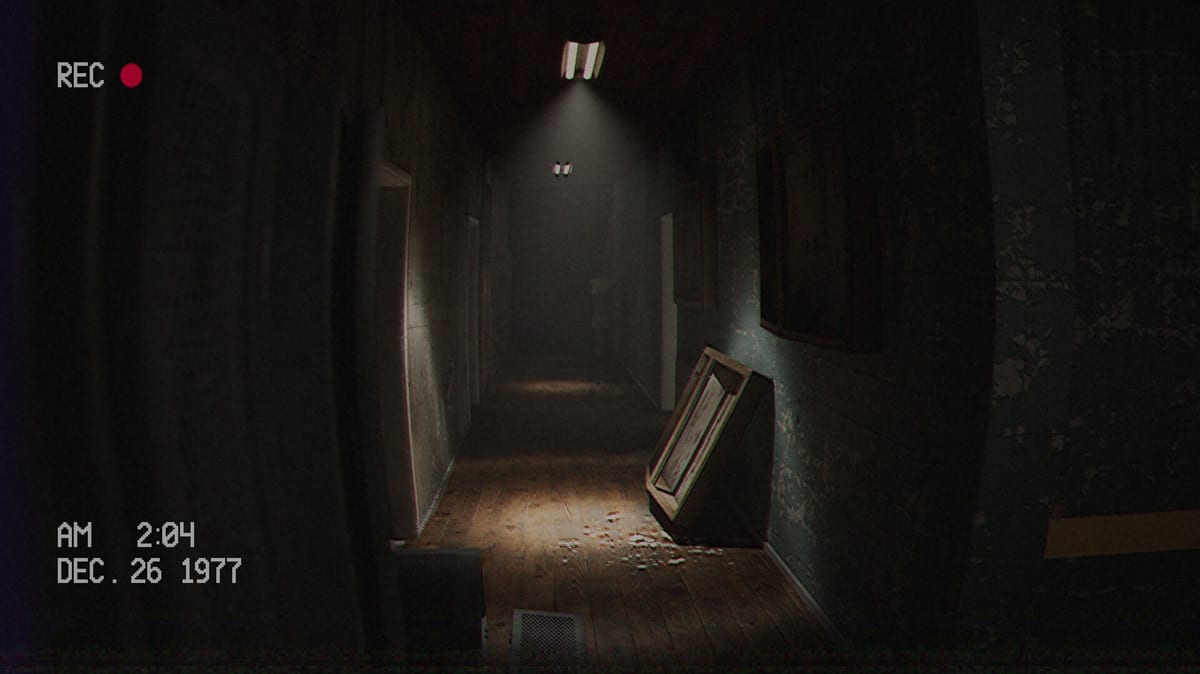
Below, Rusted Gods treats dread as infrastructure. Facility anomalies are not random jumpscares bolted onto a radio sim—they are authored events that stress the Operator contract: instruments promise safety, the building refuses, and your job is to reconcile both without abandoning the squad channel. This page documents anomaly language, telegraphed scares, peephole and bathroom beats, and what to do when radar, status, and your eyes disagree. It complements Facility Exploration (when to walk) and Radar & Status (how to read instruments)—it does not duplicate their walkthroughs.
Anomaly versus event
Operators use both words loosely. On this wiki:
- Anomaly — anything instruments flag that you have not visually confirmed: radar bearing shifts near the facility, status flickers without matching dialogue, audio that suggests movement down a corridor the CRTs ignore.
- Event — a scripted beat that resolves the anomaly temporarily: a peephole inspection, a bathroom cue, a corridor soundscape, a scare that advances story after you complete the authorized verb.
Anomalies invite action; events consume it. Skipping the event leaves the anomaly cycling on your checklist forever—see How to Progress When Stuck.
Telegraphed scares (not cheap surprises)
Demo culture and the embedded mid-article footage show a consistent design ethic: many scares are announced before they land. A narrow aperture appears after radio authorizes looking. A bathroom beat follows vitals work on Life Support & Squad. Footsteps precede a corridor reveal. FromSouthGames wants you complicit—you walked because the Administration asked, not because the game swapped textures without warning.
Telegraph reading habits:
- Note the last authorized verb (check, look, wait, hold) on the Operator Checklist.
- Treat silence after authorization as part of the scare, not a bug.
- Do not sprint through peephole beats; audio often carries the progression token.
- Return to the desk and run status → radar → radio after the event completes.
If a scare felt “unfair,” replay sixty seconds with headphones—Headphones & Audio—before filing a report.
Peephole and bathroom beats as anomaly events
Facility Exploration explains when to stand. Anomalies & Events explains what class of horror you are in:
| Beat type | Anomaly signal | Event resolution |
|---|---|---|
| Peephole | Look / inspect language; narrow interact prompt | Hold gaze through aperture; absorb audio |
| Bathroom | Vitals checked; facility-side radar ping | Walk authorized corridor; interact highlighted fixtures |
| Corridor audio | Movement without squad contact | Slow walk; do not leave authorized path |
| Desk-side glitch | CRT flicker while squad channel stable | Often precedes walking authorization—finish radio beat first |
Bathroom beats are uncomfortable by design—psychological horror, not gore tourism. Steam lists mature descriptors; plan sessions accordingly (Release & Demo).
When instruments disagree
Disagreement is authored tension, not a settings bug—unless it persists across reloads.
Radar says movement; status looks stable. May foreshadow a facility-side event while the squad remains operational in the abyss feed. Sweep once, log bearing, finish radio. If audio sends you walking, prioritize Facility Exploration over panic calls.
Status degrades; radar calm. May prioritize medical console attention or separation responses—see Life Support & Squad and Terminals & Radio. Do not assume “no ping means safe.”
Squad voices calm; facility audio hostile. Classic Operator horror: emotional denial versus environmental truth. Trust the triple log (status, radar, last line) on your checklist.
Everything idle after an event. You likely skipped the return desk loop. Re-run instruments before declaring a soft-lock.
Deep instrument literacy: Radar & Status. Spatial context: Operator Station.
Creepy occurrences outside combat
Not every anomaly resolves in a scream. Retail may expand:
- Environmental storytelling — lights, posters, Administration paperwork that contradicts squad reports.
- Cassette foreshadowing — old conversations that explain why instruments lag; process tapes on Cassettes & Lore between crises.
- Repeat visits — the same corridor feeling “wrong” on a second pass after a tape unlocks new context.
- Branching consequences — bad calls may kill squad members in the full game (Decisions & Branching); anomalies become moral weight, not set dressing.
The demo is on-rails; retail advertises expanded facilities and endings. Anomaly literacy you build now still applies—do not spoil routes on Endings early.
Anomaly response protocol
Use this when something feels wrong but you are not sure it is a puzzle gate:
- Headphones on; replay last minute of dialogue.
- Status snapshot → single radar sweep → radio hold until sentence ends.
- Check for unplayed cassettes.
- If authorized, walk once through the flagged space slowly.
- Return to desk; full instrument cycle.
- Still stuck? How to Progress When Stuck. Real bug? Bug Report Guide.
Demo footage context
The embedded video (“Something Is Down There and It Wants Out”) shows demo-era facility tension—corridor transitions, instrument stress, and the sense that something wants out while you remain the lawful Operator. Use it for mood and pacing, not as a shot-for-shot retail map. Full-game rooms may differ; track changes on Patch Notes and Launch News.
Steam Deck and portable anomalies
Steam Deck Verified (July 20, 2026) includes facility beats on default controls. Handheld play makes peephole beats more claustrophobic—keep brightness honest and headphones on (Steam Deck Verified). Comfort toggles may affect motion during corridor events—verify against Graphics & Settings and Accessibility & Comfort at launch.
Launch eve note (Jul 28, 2026)
Retail unlocks July 29, 2026—roughly twenty-two hours from tonight. No Steam user reviews yet; anomaly behavior may shift in day-one patches. Log build IDs if reporting persistent instrument desync.
Related pages
- Facility Exploration — desk versus field authorization
- Radar & Status — ping and vitals literacy
- Headphones & Audio — catching telegraph lines
- Demo Walkthrough — phased demo route
- Bug Report Guide — when disagreement is a bug, not story
Anomalies are the facility’s paperwork. Events are your signature. Sign only when authorized.
Hubs
Systems, Guides, Tools, Overview, Updates. Store: Release & Demo. Specs: System Requirements. Tone: Review. Checklist spine: Operator Checklist.
Frequently Asked Questions
Quick answers for operators preparing for the descent.
Is an anomaly the same as a jumpscare?
Not always. Many anomalies are instrument flags or environmental cues; events often telegraph scares before they land.
Radar and status disagree—what do I trust?
Log both, finish the current radio beat, then follow authorized verbs. See [Radar & Status](/guides/radar-and-status/) and this page’s disagreement section.
How is this different from Facility Exploration?
Facility Exploration covers when to leave the desk. This page covers anomaly language, telegraphed events, and instrument-versus-reality tension.
Do bathroom beats advance the story?
Yes when authorized after vitals or radio cues—they are progression events, not optional horror rooms.
Could my anomaly be a bug?
If instrument desync persists across reloads and repro steps, use [Bug Report Guide](/tools/bug-report-guide/) after self-triage on [How to Progress](/guides/how-to-progress/).